
Office 365 Small Medium Business Plans New

Office 365 Businesses Basic Or Premium – Business Plans Comparison

With all these different Office 365 plans available in the market, what guarantees that small business owners are getting their money’s worth? With every offer better than the other how do you pick the best one for yourself? Are you confused between office 365 business basic and office 365 premium? Well that is where we come into play, here are some compare business plans Office 365 tips to help you choose the right plan for your business

Why Microsoft?

Designed to aid in managing business data, share and store files and improve group collaboration, Microsoft 365 is the ultimate productivity tool created to help you run your business in highly effective ways. Encompassing more than just apps like Word, Excel, PowerPoint, and Microsoft 365 brings together top-notch apps with strong cloud services, device management, advanced security, and simple setup all in one, connected.

Help me Choose:

Office 365 Business and Enterprise are the best choices if you’re running cloud-based business systems. Both of these plans will give you access to tons of tools that are highly effective in your business, all you need to do is choose accordingly

Comparing Business Plans for Office 365 Pricing:

To better understand the comparison of various options between 365 businesses basic and office 365 premium let’s look at individual features of the plans:

Microsoft 365 Business Basic

  • $5.00 user/month
  • (Annual commitment) Best suited for businesses that require easy and remote solutions to Microsoft Teams, secure cloud storage,
  • Premium office apps incorporated are:
    • Outlook
    • Word
    • PowerPoint
    • OneNote
    • Excel
  • Secured cloud services included are:
    • Teams
    • Exchange
    • OneDrive
    • SharePoint
  • Features Explained:
    • Host email with a 50 GB mailbox and custom email domain address.
    • Create a hub for teamwork to connect your teams with Microsoft Teams.
    • Access web versions of Office apps: Outlook, Word, Excel, PowerPoint, OneNote (plus Access and Publisher for PC only).
    • Store and share files with 1 TB of OneDrive cloud storage per user.
    • Host online meetings and video conferencing for up to 300 users.
    • Get help anytime with around-the-clock phone and web support from Microsoft.
    • Compatible with Windows 10, Windows 8.1, Windows 7 Service Pack 1, and the two most recent versions of macOS. All languages included.

Microsoft 365 Business Standard

  • $12.50 user/month
  • (Annual commitment) Best for businesses that require full remote work and appropriate collaboration tools.
  • Premium office apps incorporated are:
    • Outlook
    • Word
    • PowerPoint
    • OneNote
    • Excel
    • Publisher (PC only)
    • Access (PC only)
  • Secured cloud services included are:
    • Teams
    • Exchange
    • OneDrive
    • SharePoint
  • Features Explained:
    • Get desktop versions of Office apps: Outlook, Word, Excel, PowerPoint, OneNote (plus Access and Publisher for PC only).
    • Host email with a 50 GB mailbox and custom email domain.
    • Create a hub for teamwork with Microsoft Teams.
    • Store and share files with 1 TB of OneDrive cloud storage per user.
    • Use one license to cover fully installed, Office apps on five mobile devices, five tablets, and five PCs or Macs per user.
    • Get help anytime with around-the-clock phone and web support from Microsoft.
    • Compatible with Windows 10, Windows 8.1, Windows 7 Service Pack 1, and the two most recent versions of macOS. All languages included.

Microsoft 365 Business Premium

  • $12.50 user/month
  • (Annual commitment) Best for businesses that require secure remote work solution, along with advanced cyber heat protection, device management
  • Premium Office Apps incorporated are:
    • Outlook
    • Word
    • PowerPoint
    • OneNote
    • Excel
    • Publisher (PC only)
    • Access (PC only)
  • Secured Cloud Services included are:
    • Teams
    • Exchange
    • OneDrive
    • SharePoint
    • Intune
    • Azure Information Protection

Features Explained:

  • Stay up to date with the latest versions of Word, Excel, PowerPoint, and more.
  • Connect with customers and coworkers using Outlook, Exchange, and Teams.
  • Manage your files from anywhere with 1 TB of cloud storage on OneDrive per user.
  • Defend your business against advanced cyber threats with sophisticated phishing and ransomware protection.
  • Control access to sensitive information using encryption to help keep data from being accidentally shared.
  • Secure devices that connect to your data and help keep iOS, Android, Windows, and Mac devices safe and up to date.
  • Compatible with Windows 10 Pro. Some management features are not supported in Windows Home. All languages included.

Office 365 Business or Enterprise:

  • Office 365 Business and Enterprise are the best choices if you’re starting up or running cloud-based business systems. You will get access to the data management app Office Online and file hosting service OneDrive, by both of these plans, but there are a few differences between the two.
  • Office 365 Enterprise E3 and E5 plans have unlimited archive and mail storage space. 
  • Office 365 Business plans have a 50 GB storage limit and do not provide archive access from the Outlook client. In terms of SharePoint, business plans are lacking in enterprise search, Excel services, and Visio features. They also lack unified communication solutions, such as Power BI, an interactive data visualization tool, and Delve Analytics, which provides real-time work analytics to businesses.

Features Explained:

  • Stay up to date with the latest versions of Word, Excel, PowerPoint, and more.
  • Connect with customers and coworkers using Outlook, Exchange, and Teams.
  • Manage your files from anywhere with 1 TB of cloud storage on OneDrive per user.
  • Defend your business against advanced cyber threats with sophisticated phishing and ransomware protection.
  • Control access to sensitive information using encryption to help keep data from being accidentally shared.
  • Secure devices that connect to your data and help keep iOS, Android, Windows, and Mac devices safe and up to date.
  • Compatible with Windows 10 Pro. Some management features are not supported in Windows Home. All languages included.

Office 365 Business or Enterprise:

  • Office 365 Business and Enterprise are the best choices if you’re starting up or running cloud-based business systems. You will get access to the data management app Office Online and file hosting service OneDrive, by both of these plans, but there are a few differences between the two.
  • Office 365 Enterprise E3 and E5 plans have unlimited archive and mail storage space. 
  • Office 365 Business plans have a 50 GB storage limit and do not provide archive access from the Outlook client. In terms of SharePoint, business plans are lacking in enterprise search, Excel services, and Visio features. They also lack unified communication solutions, such as Power BI, an interactive data visualization tool, and Delve Analytics, which provides real-time work analytics to businesses.

When To Consider Office Enterprise?

As a general rule, people usually subscribe to Enterprise plans when employee headcount exceeds 50 people and users require more storage space solutions. Otherwise, Office 365 Business Plan is the best choice for small businesses. The highest-end Enterprise plan costs $35 per user per month.

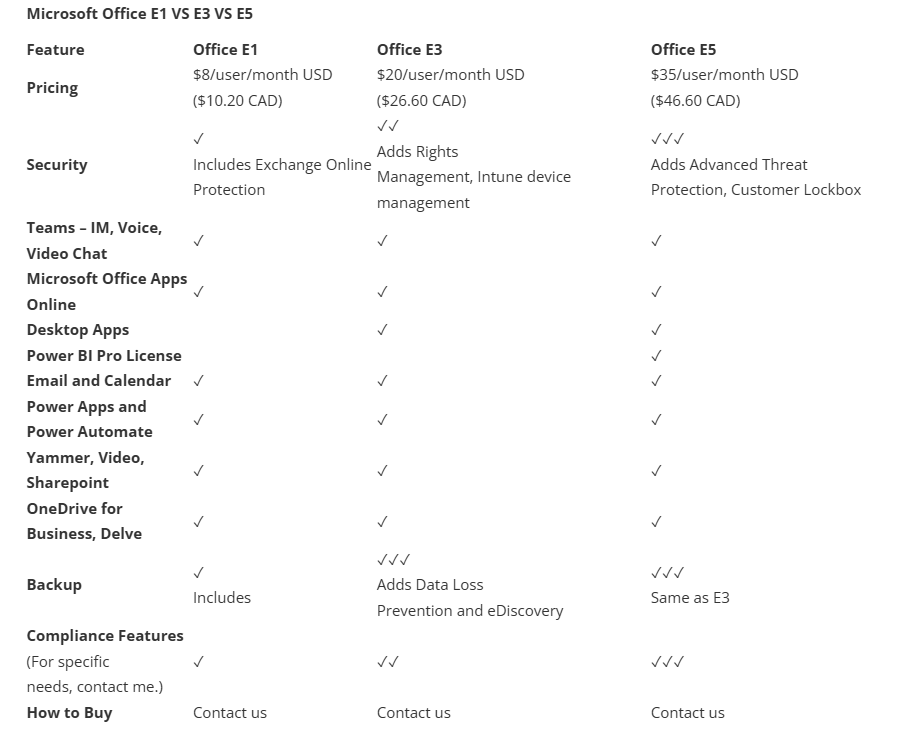
Comparing Office 365 Enterprise E1, E3. Or E5

If you have a noteworthy headcount and decided to go for the Office 365 Enterprise, you need to choose which of the three plans E1, E3, or E5 is best suited for your business requirements. Each of these plans includes a variety of features with each plan surpassing the other

Office 365 Enterprise E1 plans: It is the least stuffed plan of the enterprise and offers only basic solutions, such as Outlook, Word, OneNote, PowerPoint, and Excel for only $8 per month. for businesses. But keep in mind that the E1 plan does not allow the installation of applications on devices such as laptops, smartphones, or tablets so, in other words, a constant, secure Internet connection is required to use this plan for your business.

Office 365 Enterprise E3 plans: provide all E1 features with data loss prevention, rights management, and encryption to help ensure your business’s security and compliance. It is slightly more expensive than E1 but the added features justify it.

Office 365 Enterprise E5 plans: are a full enterprise-grade solution with all the above features in E3 plus analytics tools, advanced threat protection, flexible Skype for Business conferencing, and unified communications solution

Microsoft Office E1 VS E3 VS E5

Related Services

Office 365 Small & Medium Business Plans​

Office 365 Small & Medium Business Plans

With many Office 365 plans available, small business owners often find it difficult to identify the best value for their investment. As each plan offers different features and benefits, carefully comparing options is essential to choose the right solution that meets business needs and budget.
Office 365 Enterprise Plans

Microsoft Office 365 Enterprise Plans

The world outside us has altered dramatically since the last Microsoft Office Design. Every client and worker is now concentrated on the newly designed work conditions—the opportunity to work from anywhere, at any time, and on any gadget.
Microsoft Azure

Microsoft Azure

Azure, as a cloud-based platform, is highly flexible — it can back up files from any OS, in any language, and from anywhere. You also have full control over your backup schedule and scope, choosing daily, weekly, monthly, or custom intervals to suit your business needs.

Cloud Application Solutions

Cloud Application Solutions

Application Services include tools and processes to install, run, and optimize applications, covering load balancing, performance monitoring, security, and updates to ensure efficient, reliable, and high-performing software operations for businesses and users.

Infrastructure

Infrastructure

Do you want to set up a new IT infrastructure for your business or need expert support to manage and optimize your existing systems efficiently? Our IT specialists provide tailored solutions to ensure seamless operations, security, and growth for your organization.

Cloud Hosting Solutions

Cloud Hosting Solutions

Tired of tape backups and frequent replacements? Switch to a CDP backup solution for modern, customizable data storage. Ensure secure, efficient, and up-to-date protection as traditional tape technology can’t meet today’s business demands.

Scroll to Top